Excel Grader2.7
Publisher Description
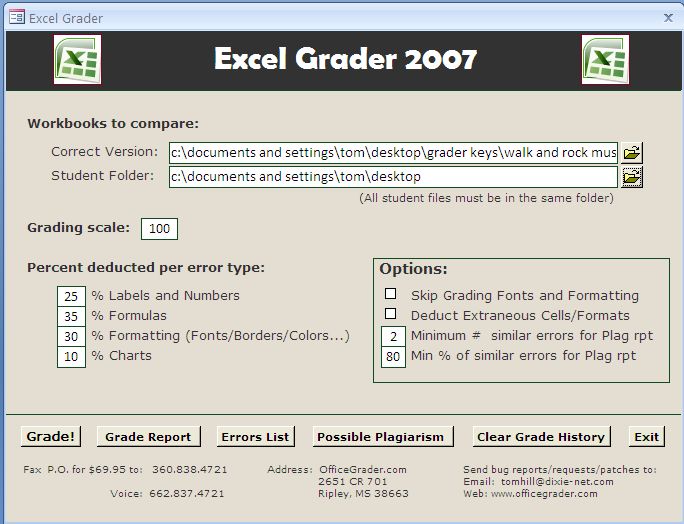
Excel Automated Grader is an automated grader/marker for use by instructors in Microsoft Excel and Microsoft Office application courses. Excel Grader performs static analysis on Microsoft Excel workbooks. The program compares a student workbook with the instructors correct version of the workbook. The student workbook is marked and a grade report is embedded. Excel Grader includes reports and a tool for plagiarism detection.
Excel Grader grades the following worksheet attributes: text labels, numbers , formulas, fonts (face, size, style: bold/italics/underline, color), cell alignment (left/right/center), cell fill color, indent level, cell orientation (tilt), number formats (currency, percent, accounting, scientific, etc.), borders (color, thickness, style: solid, broken, etc.), row height, column width, merged ranges, worksheet names, chart type, subtype, chart location, and chart source data
The grader has been used Microsoft Office applications classes for over three years. Thousands of assignments have been graded. According to a survey of instructors using the programs, the graders were extremely accurate and saved hours of grading time. Students that were surveyed felt the grading was fair and accurate.
About Excel Grader
This Teaching & Training Tools program is available in English. It was last updated on 29 September, 2026. Excel Grader is compatible with the following operating systems: Windows.
The company that develops Excel Grader is OfficeGrader.com. The latest version released by its developer is 2.7. This version was rated by 8 users of our site and has an average rating of 3.4.
The download we have available for Excel Grader has a file size of 1.0 MB. Just click the green Download button above to start the downloading process. The program is listed on our website since 2014-07-28 and was downloaded 354 times. We have already checked if the download link is safe, however for your own protection we recommend that you scan the downloaded software with your antivirus. Your antivirus may detect the Excel Grader as malware if the download link is broken.
How to install Excel Grader on your Windows device:
- Click on the Download button on our website. This will start the download from the website of the developer.
- Once the Excel Grader is downloaded click on it to start the setup process (assuming you are on a desktop computer).
- When the installation is finished you should be able to see and run the program.
Program Details
System requirements
Download information
Pricing
Version History
version 2.7
posted on 2014-07-28
Trial version.
